
Back to projects

Internal software case study

OPAP System

A local-first operations platform for fast food teams, connecting self-service ordering, payment confirmation, kitchen stations, assembly, customer order status and admin visibility in one structured workflow.

OPAP System cash desk interface

Project overview

A full operational workflow for fast food service.

OPAP System was designed as an internal platform for a fast food restaurant environment. The product covers the full path of an order: kiosk ordering, payment, kitchen preparation, assembly, public status display and final handoff at the cash desk.

The main goal was to reduce manual communication between counter staff and the kitchen. Instead of relying on verbal instructions or handwritten notes, the system turns every confirmed order into structured tasks for the right team members.

The MVP was shaped for one pilot location, with the product model prepared for future multi-location management, cloud synchronization, central menu control and local inventory rules.

6Connected interfaces
3Kitchen stations
LocalOperational model

Order lifecycle

Payment, preparation and handoff stay in one reliable sequence.

  1. 01Customer builds an order on the self-service kiosk
  2. 02Card payment is approved or a cash slip is created
  3. 03Cashier confirms unpaid cash orders before preparation
  4. 04The system assigns a daily order number
  5. 05Items are split and routed to the right kitchen station
  6. 06Assembly confirms the full order only when every item is done
  7. 07The public screen moves the order from preparation to ready
  8. 08Cash desk marks the completed order as collected
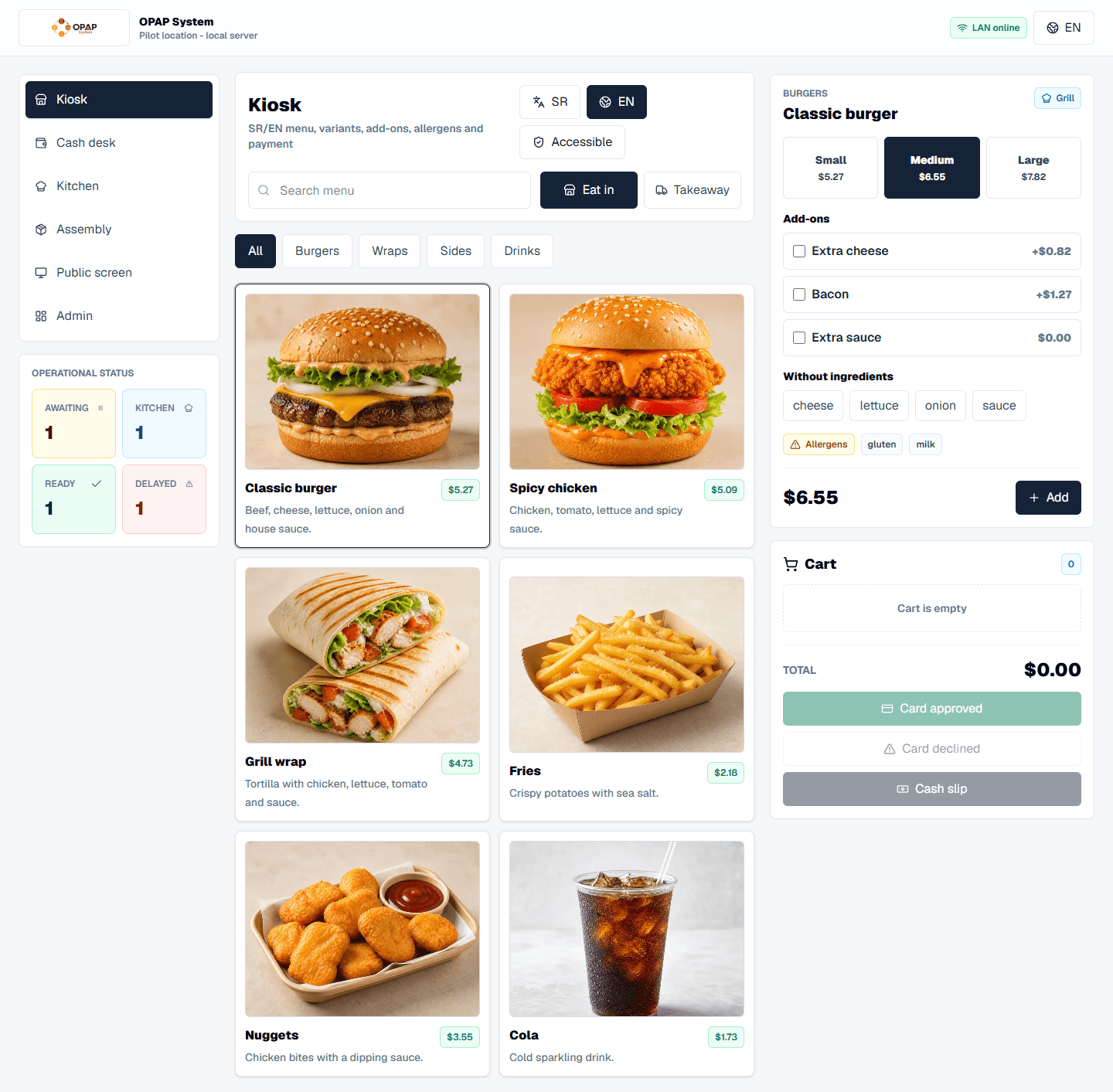
Kiosk ordering

Self-service ordering with clear product choices.

The kiosk gives customers a guided flow for choosing language, order type, products, variants, add-ons, removed ingredients and payment method without depending on counter staff for every order.

  • Serbian and English language selection
  • Eat-in and takeaway order types
  • Category browsing and product search
  • Variants, paid add-ons and removable ingredients
  • Real-time cart totals and quantity controls
  • Accessible mode with larger interface elements
Payment control

Kitchen work starts only after confirmed payment.

Card orders can move straight into preparation after approval. Cash orders first become temporary slips, so unpaid orders never create kitchen tasks or reduce stock before the cashier confirms payment.

  • Approved and declined card states in the prototype
  • Temporary cash slips for unpaid orders
  • Cashier confirmation before kitchen routing
  • Daily order number assigned after payment
  • Payment method and pickup type visibility
Kitchen stations

Each team sees only the work that belongs to them.

After payment, an order is split into item-level tasks and routed to the correct station. Grill, fryer and cold station staff can start, complete or flag only their own items.

  • Station-specific task queues
  • Elapsed time and delayed order highlighting
  • Start preparation and mark item as done actions
  • Add-on and removed ingredient badges
  • Ingredient issue flag for operational problems
Assembly

One order can finish in parts, but handoff stays complete.

The assembly screen gives staff a full view across all stations. The order cannot be marked ready until every active item is complete, preventing partial handoffs at the counter.

  • Active order overview across all stations
  • Per-item station and status visibility
  • Warning badges for reported issues
  • Ready action locked until all items are done
  • Return item to preparation with a reason
Public screen

Customers see order status without internal noise.

The public display communicates only what customers need while they wait: which daily order numbers are in preparation and which are ready for pickup.

  • In preparation and ready columns
  • Large daily order numbers
  • High-contrast customer-facing display
  • Real-time status movement
  • Fewer repeated questions at the counter
Admin and stock

Management visibility for sales, stock and sync state.

The admin area connects revenue, order count, stock indicators, menu availability, inventory adjustments, audit history and the local-first sync concept in one management workspace.

  • Revenue and order overview
  • Recipe-based product availability
  • Low-stock indicators and minimum thresholds
  • Manual inventory adjustments
  • Audit log and CSV/PDF export actions
  • Online/offline and sync queue indicators

Technical foundation

Built as a role-based prototype for real restaurant operations.

The interactive MVP is built as a modern web application with Next.js, React, TypeScript, Tailwind CSS and Lucide React icons. It keeps all operational roles in one responsive product so the complete workflow can be demonstrated without separate deployments for every screen.

The product requirements define a local-first deployment model: kiosk, cash desk, kitchen screens, public display and admin tools should keep working over the restaurant network even when internet access is interrupted. Cloud sync can then happen through queued, idempotent updates.

Next.jsReactTypeScriptTailwind CSSRole-based UIInventory logicPayment adapter conceptLocal-first architecture

Build your internal system

Need software that matches the way your team actually works?

OPAP System shows how a custom internal platform can connect customer ordering, staff roles, production, stock rules and management visibility into one practical operating flow.

Send a project enquiry